About Me

My photo
I am plain spoken and say what I see, this gets me into a lot of trouble, I am kind and generous beyond normal sometimes and care deeply about my environment and world, my two sons keep me busy and focused most of the time and I have a very busy social network filled with some of the most amazing people possible. I am a student who wishes to teach other adults one day and hope to be successful in transforming individuals one at a time. I am a bahai and a very spiritual being.

Wikipedia

Search results

Showing posts with label Assignment. Show all posts

Saturday, 31 January 2015

I must be mad!

Ok so we get to choose options for an assignment on the course and I go and select E-learning, now I feel there is so much more for me learn when it comes to technology but after a few sessions I am overwhelmed with how little I actually know. Terms such as Podcast, wiki's and Vle's (visual learning environments)  have thrown me of my high horse (so to speak) I thought I was rather techno savvy, turns out I am more like a techno toddler. Now I have hyperlinked those techno words just in case you would like to know more about these things (not sure what to call them), as I now know how little I actually did know.

So I have delved into the world of creating a web space or page to develop for my future or current learners, and I must admit I find it all very exciting (overwhelming, but I love a challenge), it gives me a chance to get creative, and for those who know me I am not very creative so find any means that gives me creative licence exciting. I looked at good few different sites but the one which I clicked with straight away was Word press. I found it easy to use and set up a VLE (very basic I may add) within hours, I felt accomplished and very clever. The techno toddler graduated.
 
 
Now the issue I face is I know a little but not a lot so here the hard work starts. I am snowed under actually trying to teach, create and deliver a blended learning programs and stay on top of my work life balance, but I can already see the value of me giving up my time to develop a resource which will  in the future assist me in my teaching.

Saturday, 6 December 2014

ICT & Teaching Practice

So part of my new teaching journey involves putting together a portfolio of my teaching practise, and the sheer fact that I have to use ICT to put it together I feel needs a mention. Not only does the use ICT mean that the portfolio is easy to navigate through and clear to understand but the whole of my teaching practise is underpinned through using ICT. In fact I think it is key to mention at this point, that this blog shall be transferred to my tutor using an online admission tool known as turnitin, which I am also currently using to grade some of my own students work on.


The whole system is a plagiarism checker, (which is another modern day phenomena, as it is so easy to copy and paste from one web page to another) but also a good teaching tool. This system allows draft copies of assignments to be uploaded and feedback to be given electronically. This enables real time marking for the teacher and faster turn around on receiving feedback which may improve the paper for the students. The system is simple in many aspects, for example it is a simple data base which cross references every word which has been submitted by the student to check for any similarities with  anything which is online. This system also enables the deadlines of assignments to be closed after a certain time, so any late entries are easy to point out.
 
A lot of the lessons plans which will be within the portfolio I am currently complying will evidence the use of PowerPoint, this application has become my greatest companion, and the clever use of ICT within the University means during my lectures I have access  to TWO monitors, The primary monitor enables me to see notes which I have made upon the topic I am lecturing on, while the other shows only the presentation mode of the PowerPoint slides. I must admit I love this facility and it has made my first few weeks of teaching so much easier. I have even done a few Quiz type sessions in the lecture theatre with the PowerPoint showing the questions and then when I hit enter the answer pops up on the big screen. The students all of which fed back they enjoyed.
 
I am also able to then transfer the original lecture into a blended learning program for the students who are doing the single honours distance learning course. The likes of which would not be available without the use of ICT. I am also able to translate the seminar classes I am taking which are rather experiential over to the blended learning. The simple use of voice recording over the PowerPoint and time delays on the slide show enable me as the educator to provide reflective exercises which can be done anywhere, anytime.
 
One of the  modules I am teaching on have a first assignment due in a few days and they must use ICT to provide a portfolio of research they have under taken. The whole module is regarding employability skills and so it is paramount that the students are able to use ICT effectively for a good chance of being employed after they graduate. It is clear to see how the use of ICT is not just about education, but also the key skills which are needed now just to get by in life.  I found some very interesting research which had been performed regarding ICT and employability as I was interested in making my students aware of the use of doing well in the module wasn't just about getting through the degree but actually more to do with key skills.  The research which has a link to it above had many findings but one I felt was more relevant was that users which were attending their workshops on "how to use ICT" were there for vocational rather than social or recreational reasons. I was sure to point my students in the same direction.
 
The university that I am based within doesn't have online registration or record keeping procedures which use  ICT at the ground level. The paper system is still used. But I am sure this will all be changed as soon as they move to the new campus (in a few years) as most institutes now do most record keeping using ICT.  The last point I would like to make within this post is that I am able to offer students online tutorials within a time frame that suits then. Logging on to an online forum, such as Todays Meet, or even using the system they have on their own VLE (moodule) make it easy to touch base with everyone both on the full time or blended learning course, this makes the teaching experience very technological but very enjoyable.  

 
References
Goodison, T ., Green, A., Owen, D., & Rooney, S. (2004). ICT and Employability. Available: http://www2.warwick.ac.uk/fac/soc/ier/publications/2004/goodison_et_al_2004_rr534.pdf. Last accessed 01/12/2014 



Friday, 7 November 2014

The 5 minute lesson plan

 So being in H E is tough as far as lesson planning goes, the lecture is a straight forward chalk and talk really so easy to plan for but doesn't really show depth of teaching strategy or application of teaching knowledge.  I am roughly spending about an hour per plan and that's time consuming as taking 9 hours of teaching on just my second week. So I found some very useful tools which I could use to speed my lesson planning up. The 5 minute lesson plan is perfect for me, As I have to spend a lot of time brushing up on my knowledge. Those undergrads take no prisoners.  The 5 Minute lesson planis now a daily feature in daily work.


I also found a quick guide to lesson planning which I have now posted on to my office wall until it becomes like second nature to think of my lesson aims and objectives. What I found more useful here was the evaluation section, we all hear the buzz word "reflective" and I am trying to evaluate each of my lessons at the moment as a tool to enhance my teaching so this will only make that "reflective" practise easier for me.

Another useful tool I found in my research for quick lesson planning was a glossary of teaching strategies, this is perfect for seminar preparation when I am trying to think of ways to make learning experiential rather than just the normal boring look at a journal and discuss seminar work that I was victim too. All in All a few hours research has saved me hours of planning and thinking in the future.


Wednesday, 5 November 2014

Blended Learning becomes Real

So here I am scratching my head thinking how do I do a flipped class room lesson?

I have a cunning plan a little voice in my head says and off we go. You tube is first point of call for my cunning plan, I don't want to pester my mentor and feel I can work this out if I just dedicate a few hours to it. I have already at this point researched the topic I am covering so I know that's ready to go at least. I found a very useful little clip which enabled me to learn how to put audio on a power point with timings so the slides move as and when I want them too. It is at this point PANIC sets in. I haven't done a power point yet..... In my haste I overlooked the one thing I needed most. All I can do now is smile and start work on the power point presentation.


The power point was ready just a few hours later and hopefully you can see it here!  now I haven't worked out yet how to blog a Power Point with audio but I am sure I will no doubt work it. Anyway back to my story so after watching the You tube clip and finally completing my presentation I record my audio, It goes well and I am happy with it, but I can't get the darn thing to play back, nothing, not a word, so I record it again and then again and still nothing, panic and frustration set in. I walk away from the computer, stand back to take a deep breath, think, think, think, means I can't think.... eventually I check it is not on mute...bet you can't GUESS the issue... It was on MUTE... while I was happy and pleased, I felt so dumb, technology and me just don't seem to mix but I did learn a new skill and was super pleased sending the finished presentation to my mentor for uploading to the VLE.
It did make me think though about the pro's and cons of a blended learning program and I can across a good web page reagrding the Pro's and Cons of Blended learning.

 My own experience was overall a great one when I used a system designed by the Open University, but I can see how easy it would be for students to fall behind when registered upon a self-directed learning course. One of the benefits of seeing your students is that you remind them, encourage them and offer extra support, but when everything is done via email I think it may not have the same impact. Another issue would be how do you keep the students motivated if they are self-directed? It is a tough one for an educator to balance out but I am sure those are skills I will no doubt learn soon enough. The main pro for blended learning which makes me a great advocate for it is that Increases accessibility, which no doubt means individuals who may never get access to education surely have a better chance now.

References
Bright, S. (2014). Pros and Cons of Blended Learning. Available:http://www.digitalchalk.com/blog/pros-and-cons-of-blended-learning . Last accessed 17/11/2014

Tuesday, 4 November 2014

Review of Learning with E's Blogging!

I spent a good few nights sat at my desk in the dark with just the only light coming from my screen to illuminate my face, looking for a good blog which I felt would be useful to me in my teaching  endeavour. There were so many to plough through (almost like a needle in a haystack), lots of  good pictures, catchy titles and great information but nothing really got me locked in. Until one night just by chance I stumble into this page  I am hooked. He uses all the right buzz words for me and my brain.
Steve Wheeler  states "I'm working through the alphabet of psychologists and theorists, providing a brief overview of each theory, and how it can be applied in education" and this fits perfectly with my outlook on teaching, I love theory and so need to read more on it but just don't have time, now I can read one post a day and all will be revealed.

The blog is set up in such a easy to use way and even has the options to change the design and layout which I think make it so interactive and for my dyslexic issues it makes it easy to read (as I can change the options which suit me best). He looks at how effective are the P L E 's and has posts regarding  the future of technology in education which can be seen here. Every post I come across I find I am super involved and just wish to know more for example what is digital learning.  The blog not only will be useful to enhance and assist my own teaching skills, but I feel the blog has such amazing insights and information it would be useful for almost anyone. I am very excited to have found his blog and that either makes me need to get out more or fully committed to my new role as an educator in the 21st century. Maybe I should let u decide?

Wednesday, 1 October 2014

bubble.us


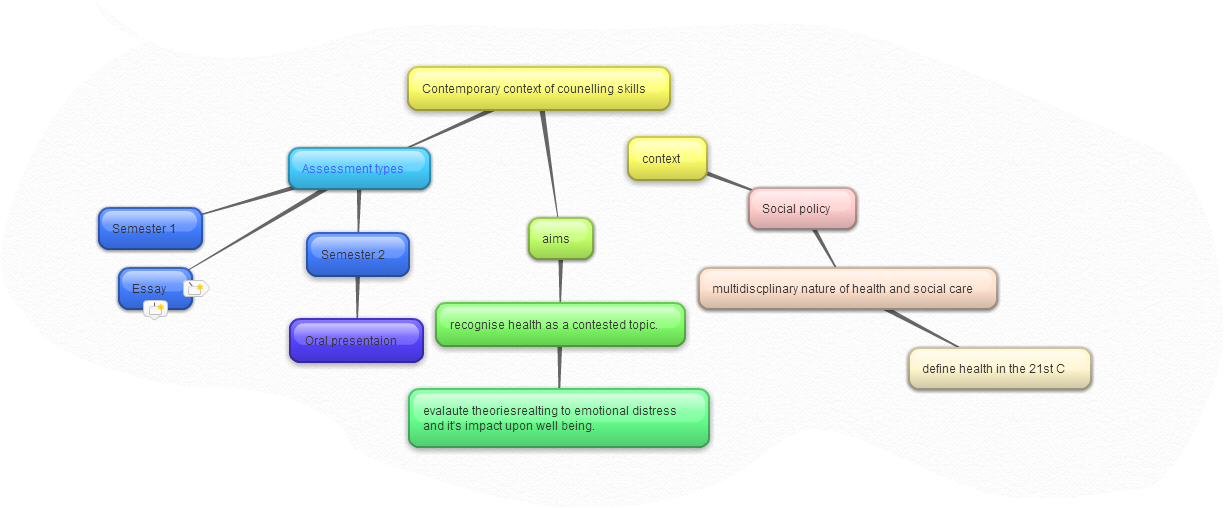
Today we worked with an application known as Bubbl.us. I must be honest I couldn't see it being used much within the area I am teaching within apart from my own personal use. It would be useful as a tool to plan a series of lessons with the overall objectives clear to see.  I have also looked into why others would use brainstorming.

  I also have a program upon my laptop mind maps which is a tool directly linked to my dyslexia. I have not used this program but will be trying to work my way around it in future.
This application can be used for reflective practise within the field of teaching. An idea can be developed from one single word or theme.

I think this application would be an effective tool to use in lesson or scheme of work planning and I am going to develop one upon a  10 week scheme of work I am currently working on.

Once I started playing around with the application though I started to see uses for it within my subject field. In counselling theory classes it can be used to develop a students understanding regarding a subject or concept which has been taught. I did this as an example and used the Snippet Tool to place into my Blog
  This is a useful source for anyone who is a visual and kinaesthetic  learner.  I myself find I prefer to do rather than read, using colour also engages part of my brain which reinforces the learning.
I also found that when I tried to use Bubble.us again I had forgotten a little so found this little tutorial on YouTube which helped.

Thursday, 25 September 2014

The use of microsoft applications.

I have used many microsoft applications over my life long love with technology. I dont think I could cope with the daily struggle of life without the use of the microsoft applications.


I have used many applications such as Microsoft Word and it has many internal tools and features, such as spell check and  synonyms. As a dyslexic student I am so grateful for certain tools such as the ability to change fonts and text size as my brain does not like a white background with certain fonts. Thus these features have become invaluable to me and I feel will aid and assisit me so much in my teaching role. It also has utensils such as bold, underlining and highlightening text which again is a such a great tool for teaching as it can direct the eye of the student almost instantly. Lets not forget the amazing applications such a reference builder, biblography and table of contents all of which make learning a great deal easier.
 
I do not have experience at working with excel and the application doesn't feel user to me,  the interface between user and program I feel has been overlooked and therefore i avoid this at all cost. This would be a learning opportunity for me for my CPD to start to using the program and develop my skills further.
 
I love using windows 7 and find it very user friendly, I am not a huge fan of XP or windows 8 and once again this can be used as an opportunity for growth. Not all educational establishments will use the programs I am most comfortable with so I must make sure I am able to adapt to new situations and forms of technology or applications  which i may find myself teaching in so it would not make an impact upon the efficacy of the lesson.


Power point is another amazing application from microsoft and it can be used in all sorts of settings such as business, education, recreationally. Powerpoint has many applications which can aid in teaching. It enables a educator to have a lesson planned and use the power point as a template for the lessson to run from. The power point can have embeded videos and images which enhance the learner outcomes and the teaching experience. Powerpoint has the capacity to enage the visual learner and it can become interactive.
 

Sunday, 21 September 2014

Is this for me?

Ok so after two weeks of the PECT course I feel very anxious and nervous about my life choices. I am apprehensive if this is the right path for me or have I made a big mistake? The overwhelming feeling of failure (as I have learnt today is a barrier to learning) has got me into a state where I want to turn and run and never look back. After speaking to a few of my friends who have become educators it seems apparent that a feeling of not knowing what you are doing is normal when you first start but it doesn't make it any easier for me right now.


I keep thinking if I didn't care if I was going to be successful within the role or if it didn't matter to me that students do well then that would be a strong indictor that this wasn't for me. But given the facts that I do worry and care, surely shows that I would be suited to this field of work. This complicates things further. I am in panic that my micro teaching will be a blur and no one will have learnt anything at all and that I will feel pure anxiety about my abilities even though I know I am a great planner and will have the session planned methodically. So I decided  to investigate how other trainee educator's have felt to see if I can recognise any of the insecurities that lie within myself.
I found a very useful forum which enables you to have contact with others who are in the same situation and it has a live q & a facility which I found to be very helpful.  There is a  site which has links to the blogs of other trainee educators to. I will keep this thread running for my own purposes and use it as a tool for reflection to hopefully enhance my own experience which in turn may one day be used to inspire others. For now I am happy to research the internal way I feel and the external world in which I now find myself, which is all new and strange.
I also found this Ted talk which made me feel so much better !


Tuesday, 16 September 2014

Back the furture in my home !!!!

Well where do I start, what technology do I have in my home? the hoover, the iron, the window, the bed, they are all forms of technology even the front door. But in regards to the more advanced current up to date forms we have them all, (well it feels like anyway) we have an Ison, a 12 year old boy who is constantly plugged into some form of an apple product, and we have a array of smart devices which communicate with each other. The smart TV can do everything our PC can and when hooked up to games consoles is even more accessible than any blue ray player or DVD (We haven't used DVD in our house for about 3 years). We have all the mobile technology you could ask for (who wants to talk to the people you are sitting next too anyway?) and every room is linked to the internet in some shape or form. When I was a teenager I would watch movies about the future and the promise of all the great things that would come and I agree the social world has changed a lot and that can clearly be seen in the home but I still await flying self drive cars and the hoover board.


My son is not happy unless he is surrounded like this!
Does Technology do as it promised?
I love this ted talk as it really makes me think about what I expected from technology and has it given me all it has promised. As a youngster who was sci fi mad. I would watch star trek and dream of a future where mobile technology would connect us to anyone in the universe at a simple click, and while it hasn't been invented for the universe as of yet, I am happy with the phone I carry in my pocket. My smart phone which has more power than NASA  did when they landed humans on the moon that is.
 
The ted talk is informative and the speaker presents so well, he is charismatic and I found it very easy to engage with the talk, I will b using some of those technics in my lectures in future for sure.